AI-Powered MCQ Platform

Study Smarter.
Teach with Data.

ScoreMCQ brings AI-driven quiz generation to students and institute-grade assessment tools to teachers — all in one unified platform.

<1 min Quiz Generation
Real-time Analytics
CBT-Ready Exam Interface
Scroll to explore

The Problem We're Solving

Traditional education struggles with assessment. Students don't know where they stand after studying. Teachers spend hours creating quizzes manually. And nobody has a reliable way to track improvement over time.

ScoreMCQ bridges this gap — providing AI-powered self-assessment for students and institute-grade exam tools for teachers, all built on one connected platform.

Students Can't Gauge Understanding

After studying, most students have no real-time way to test how well they've actually understood the material.

Manual Quiz Creation is Slow

Making MCQ tests from notes takes hours — time that could be spent actually teaching or studying.

No Progress Tracking

Without historical data, students can't spot weak areas or measure improvement over time.

The Mobile App

An AI-powered mobile app that turns your study notes into instant MCQ quizzes — and tracks your knowledge growth over time. Scan. Generate. Analyse.
Download ScoreMCQ on Google Play

Search for "ScoreMCQ" on the Play Store, or tap the button below to go directly to the app.

Get it on Google Play
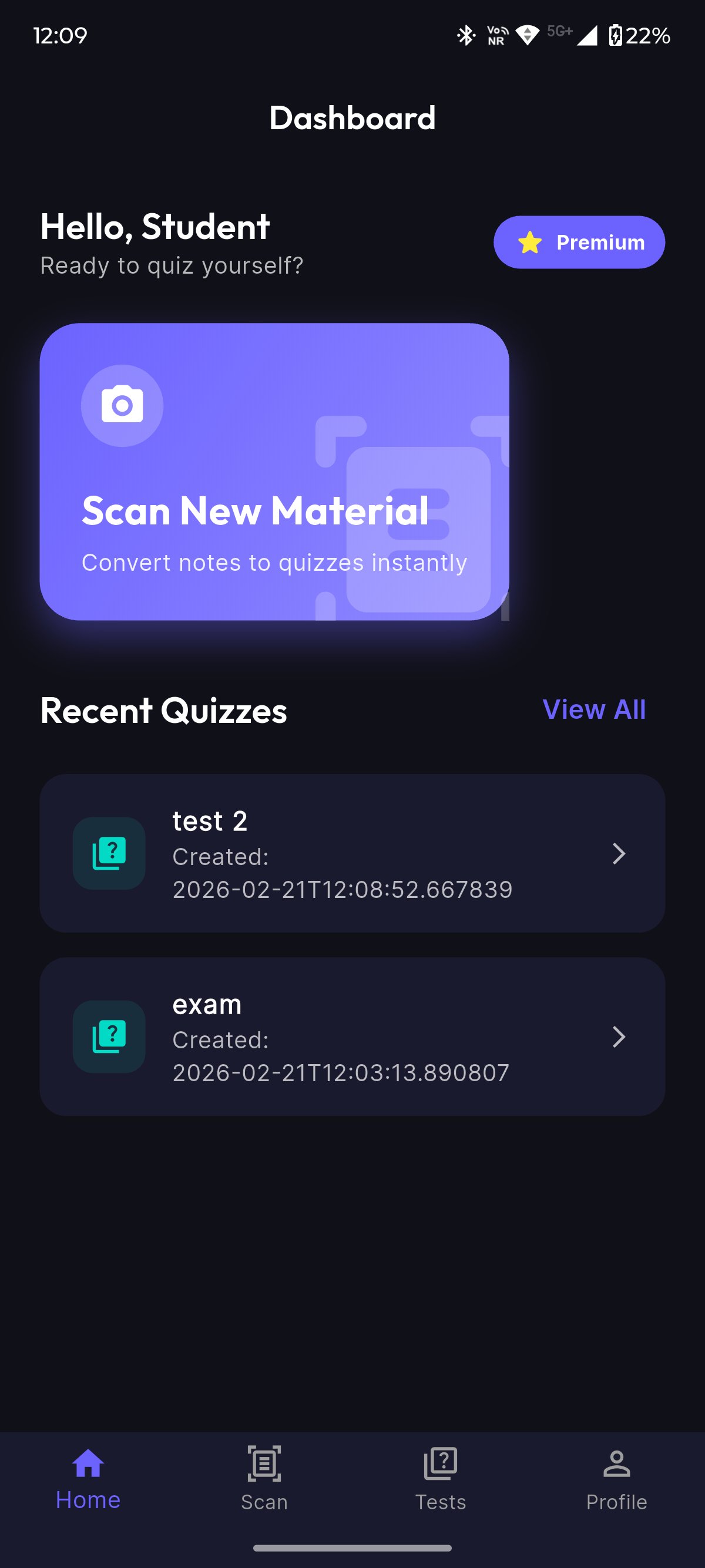
ScoreMCQ mobile app dashboard in dark mode
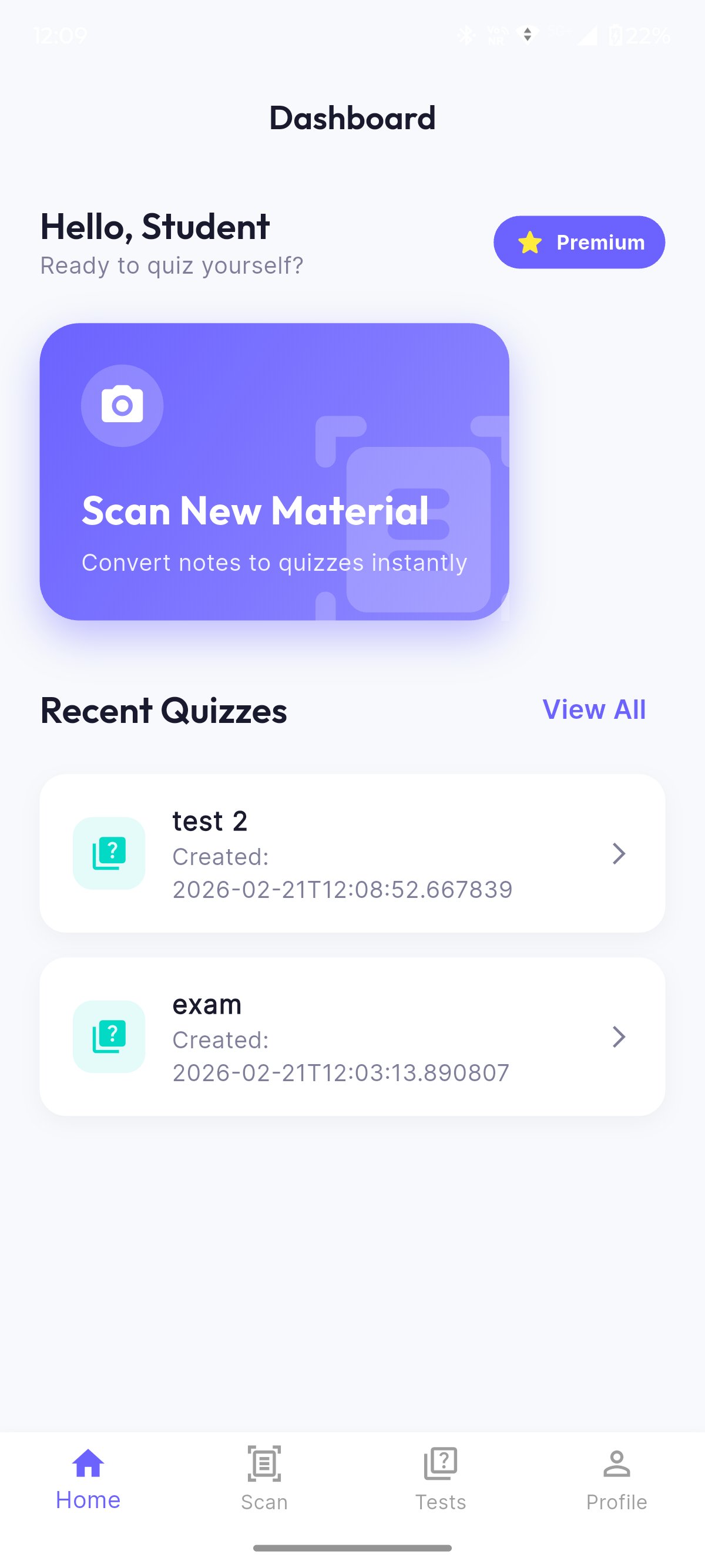
ScoreMCQ mobile app dashboard in light mode

Camera Scan

Point your camera at any printed or handwritten study material and ScoreMCQ will instantly convert it into MCQs.

AI Quiz Generation

AI automatically creates multiple-choice questions with realistic distractors from your scanned content. Takes less than a minute.

Score Analytics

Track quizzes taken, best score, average %, and performance trend — all on one beautiful dashboard.

Dark & Light Mode

Study comfortably anytime — switch between dark and light themes based on your environment and preference.

Know Exactly Where You Stand

The Score Analysis page gives you a complete picture — quizzes taken, best score, average percentage, performance trend chart, and your recent quiz history with scores.
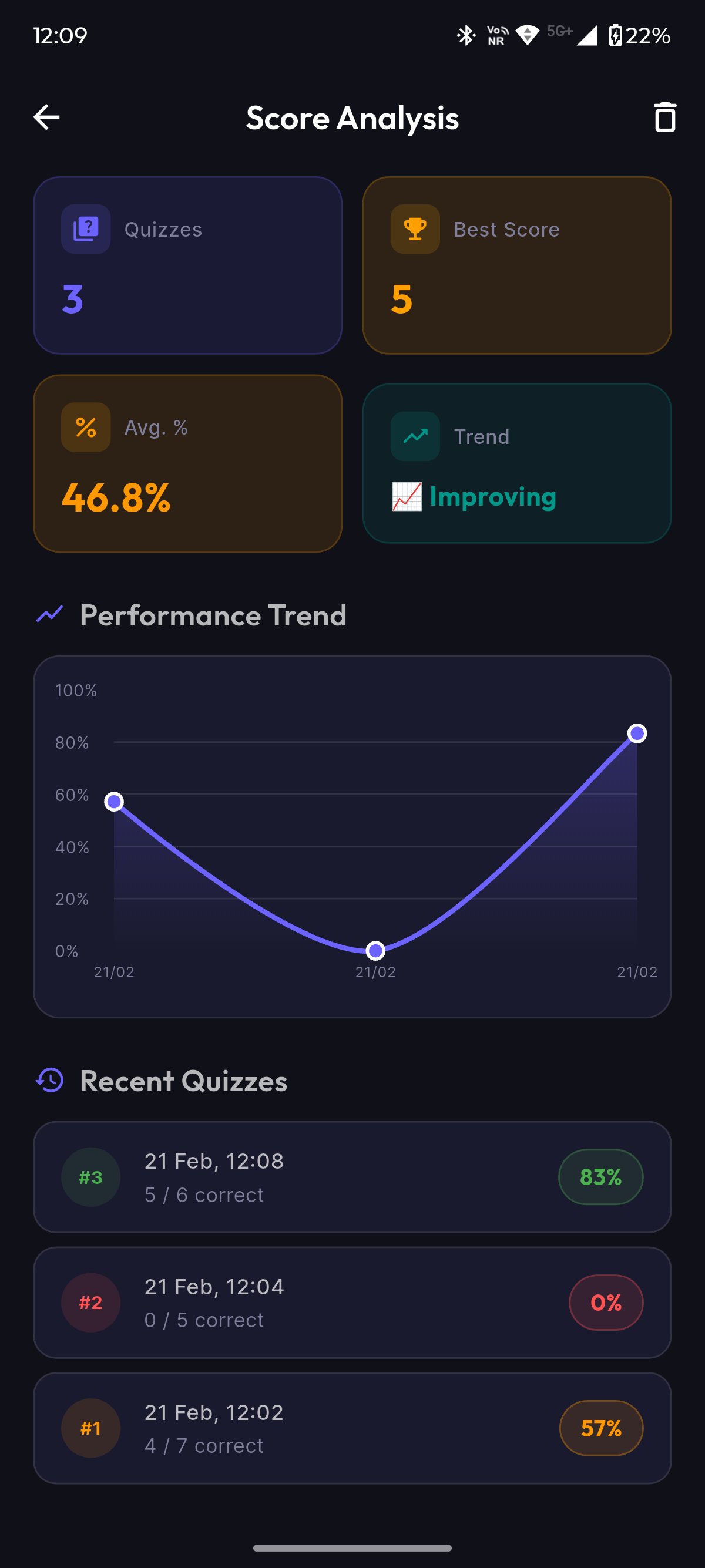
Quizzes 0
Best Score 0
Avg % 46.8%
Trend 📈 Improving
Score Analysis page showing performance trend and quiz history

See It In Action

Watch a complete walkthrough of the ScoreMCQ mobile app.
The Web App

A complete classroom management and CBT-style examination platform. Create classrooms, build quizzes, run timed exams, and get instant analytics — all from one dashboard.

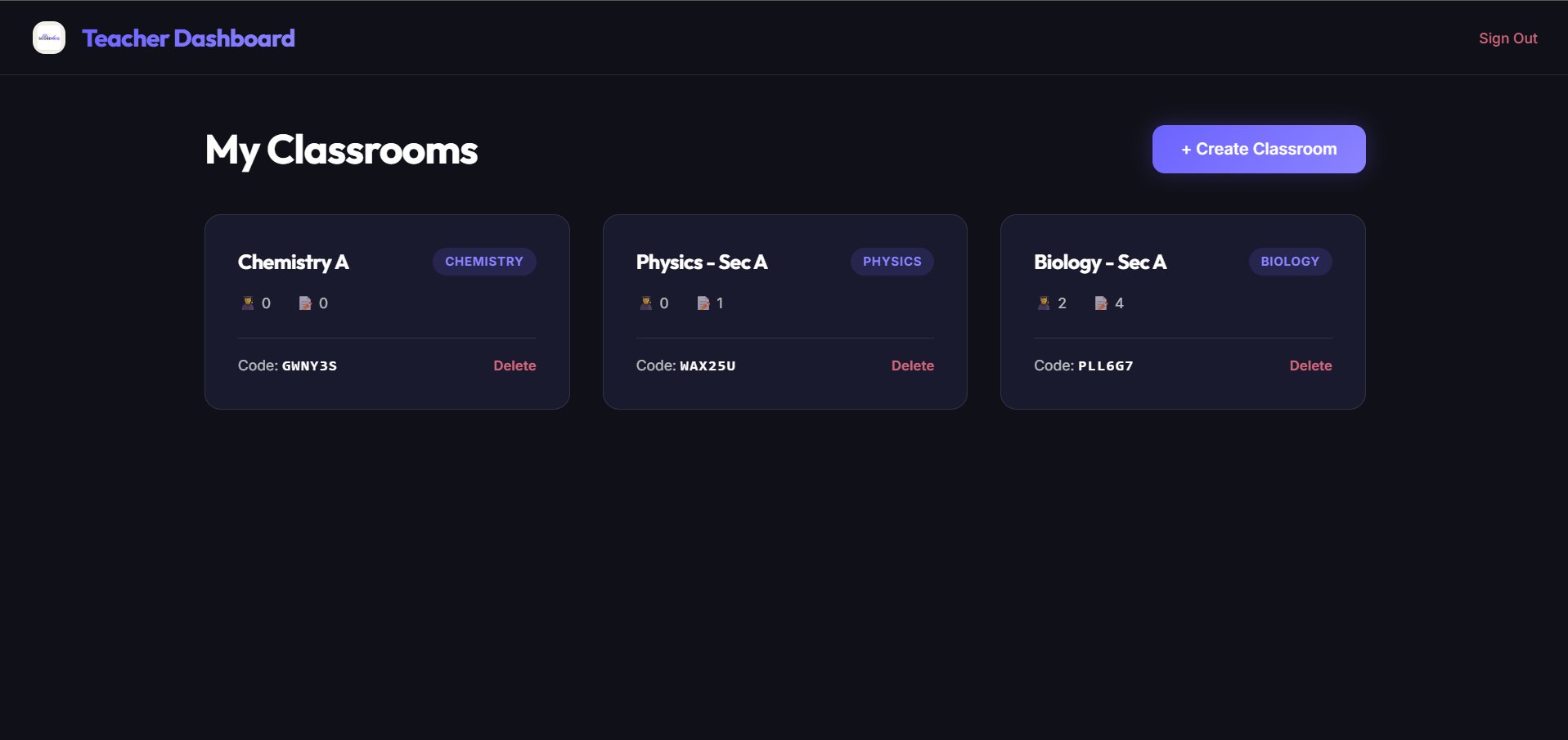
Teacher Dashboard showing multiple classrooms with join codes
01

Teacher Command Centre

Manage all classrooms, subjects, and quizzes from one unified dashboard. Each classroom gets a unique join code — students self-enrol with zero admin overhead.

  • Multiple classrooms with subject tagging
  • Unique join codes for easy enrolment
  • One-click classroom creation
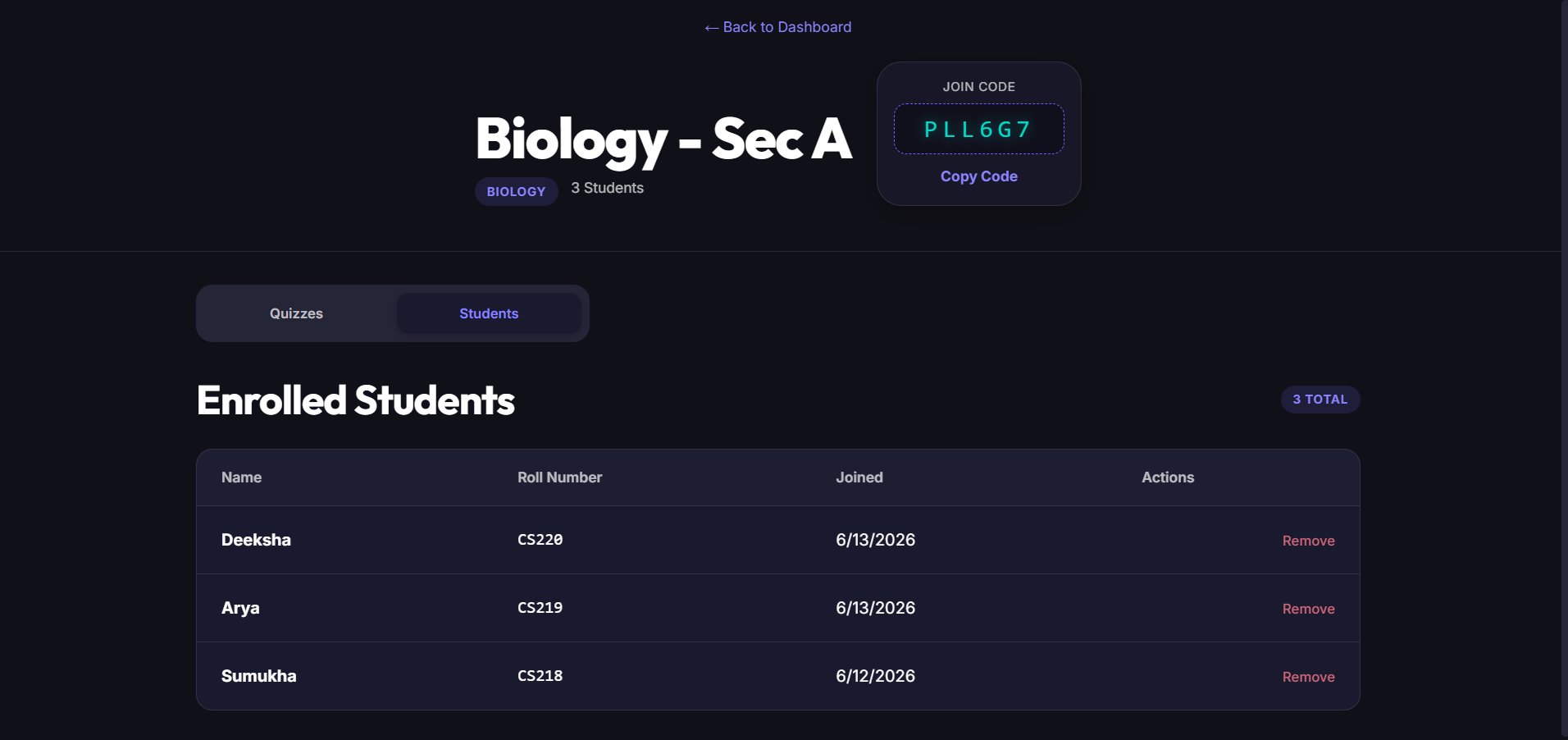
Classroom detail page showing enrolled students and join code
02

Classroom Management

View enrolled students, manage quizzes, and share join codes — all from the classroom detail page. Switch between Quizzes and Students tabs effortlessly.

  • Student roster with roll numbers
  • Copy-paste join codes
  • Tab-based navigation
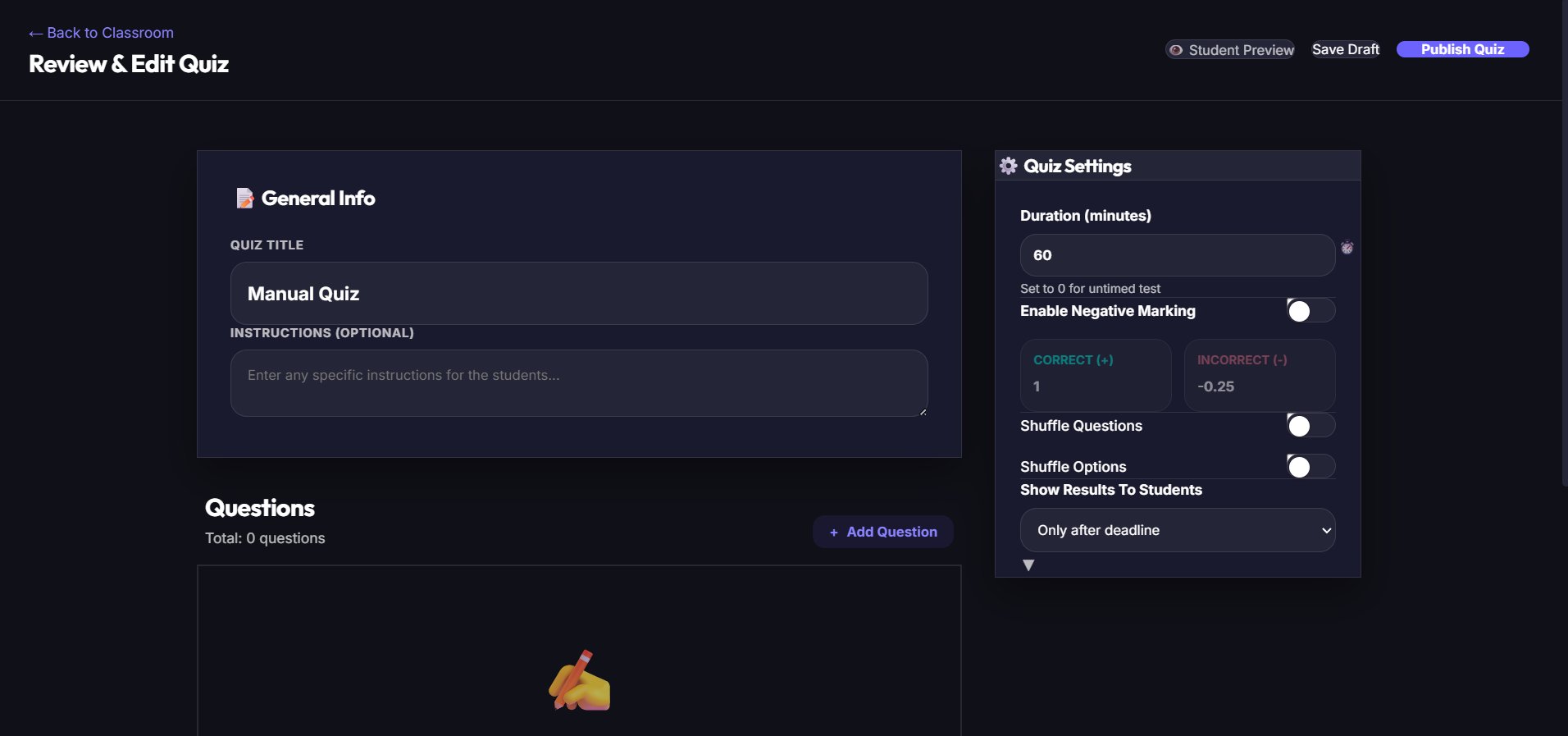
Quiz editor with settings panel showing duration, negative marking, and shuffle options
03

Create & Customise Quizzes

Full control over every quiz — from generation to grading rules. Configure duration, negative marking, question shuffle, option shuffle, and result visibility.

  • Configurable timer & negative marking
  • Shuffle questions & options per student
  • Control when results are visible
  • LBA-ready assessment format
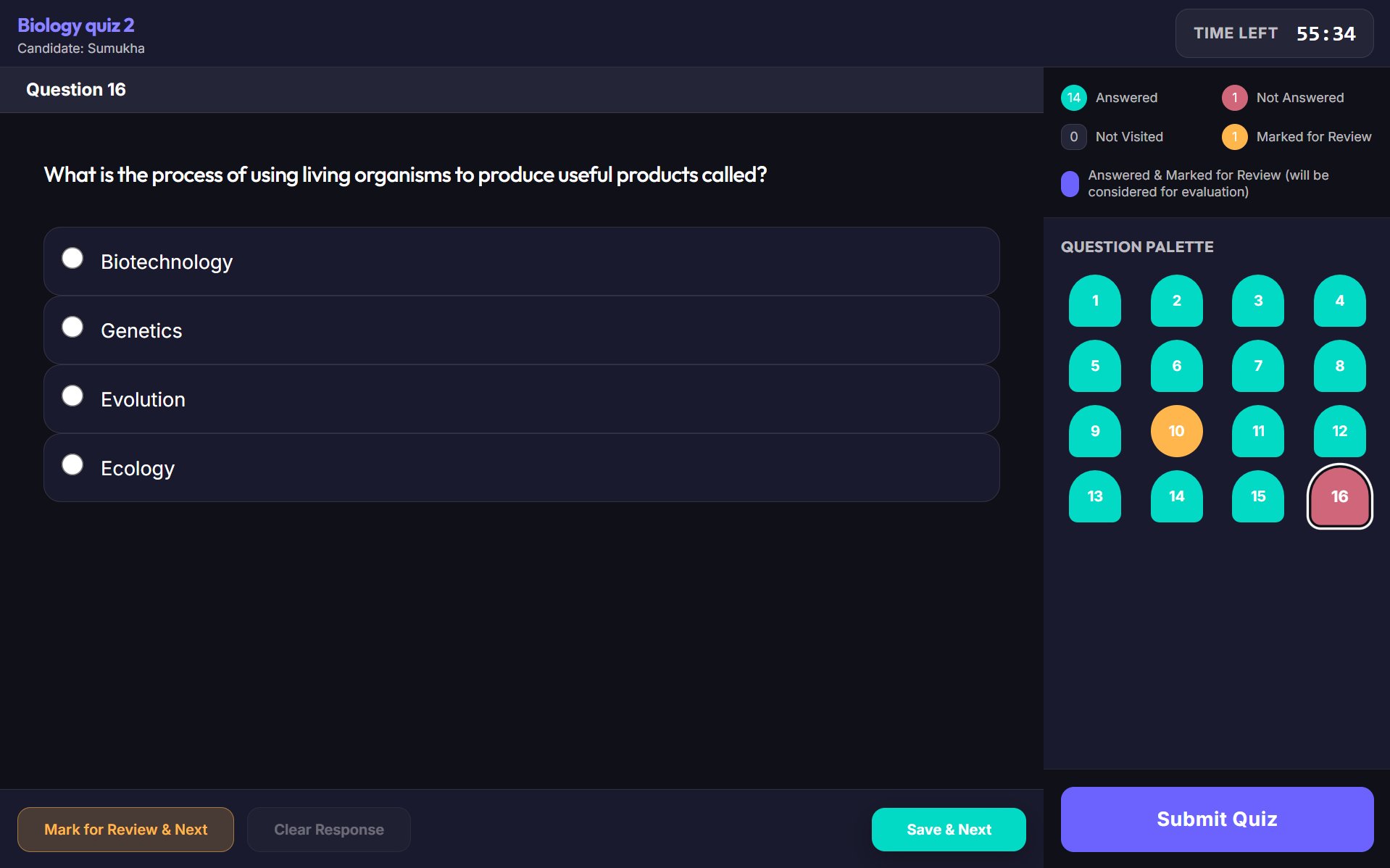
Live quiz interface with question palette, timer, and MCQ options
04

CBT-Style Live Quiz

A professional Computer-Based Testing interface with a timed countdown, question palette, mark-for-review, and colour-coded progress tracking.

  • Live countdown timer
  • Question palette with status colours
  • Mark for review functionality
  • Save & next / Clear response controls
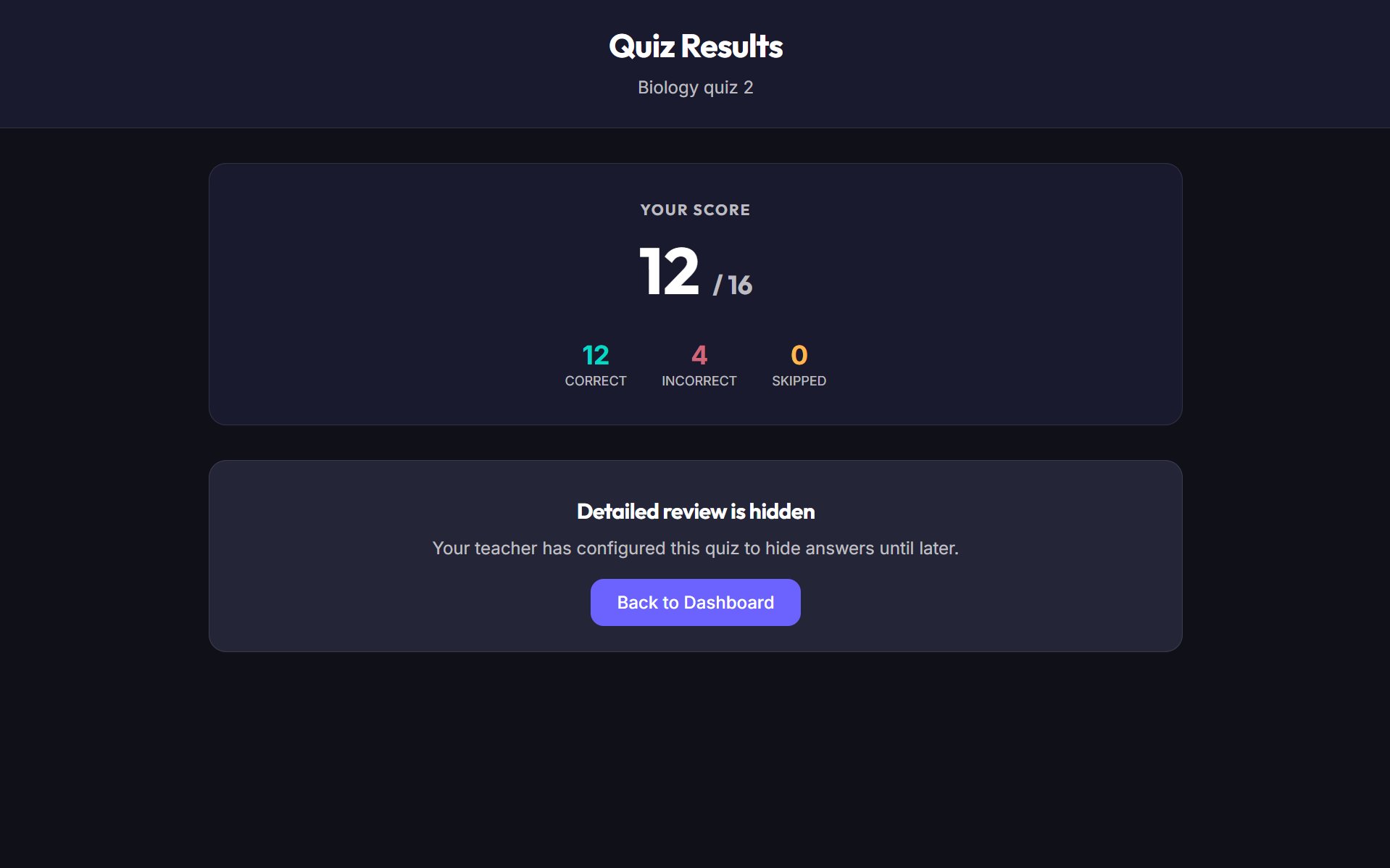
Quiz results showing score breakdown with correct, incorrect, and skipped counts
05

Instant Score Card

Students get immediate feedback with a breakdown of correct, incorrect, and skipped answers. Teachers control whether detailed review is available.

  • Score breakdown at a glance
  • Teacher-controlled review visibility
  • Clean, distraction-free results page
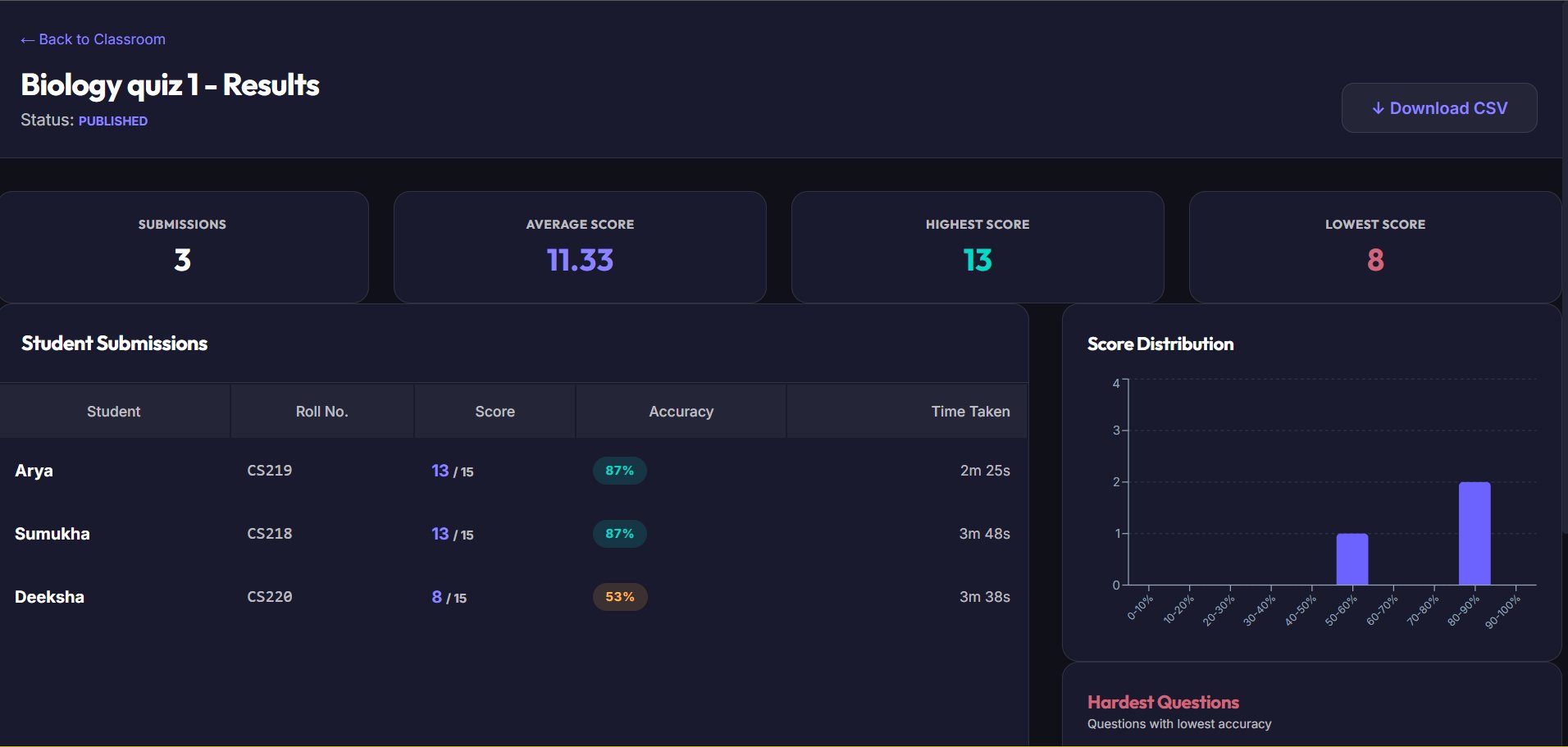
ScoreMCQ Advanced Analytics Dashboard showing score distributions and hardest questions
06

Institute-Grade Deep Analytics

Stop guessing what your students don't understand. ScoreMCQ Analytics instantly processes every submission to give you actionable insights. Identify knowledge gaps before the final exam.

  • Live Score Distributions: Visualise class performance instantly with bell-curve charts.
  • Auto-Flagged Hardest Questions: ScoreMCQ automatically identifies which specific concepts the class struggled with most.
  • Instant Grading & Metrics: View high, low, and average scores the second a quiz finishes.
  • Seamless Export: Download all grades as CSV files for easy integration into your existing institute gradebooks.
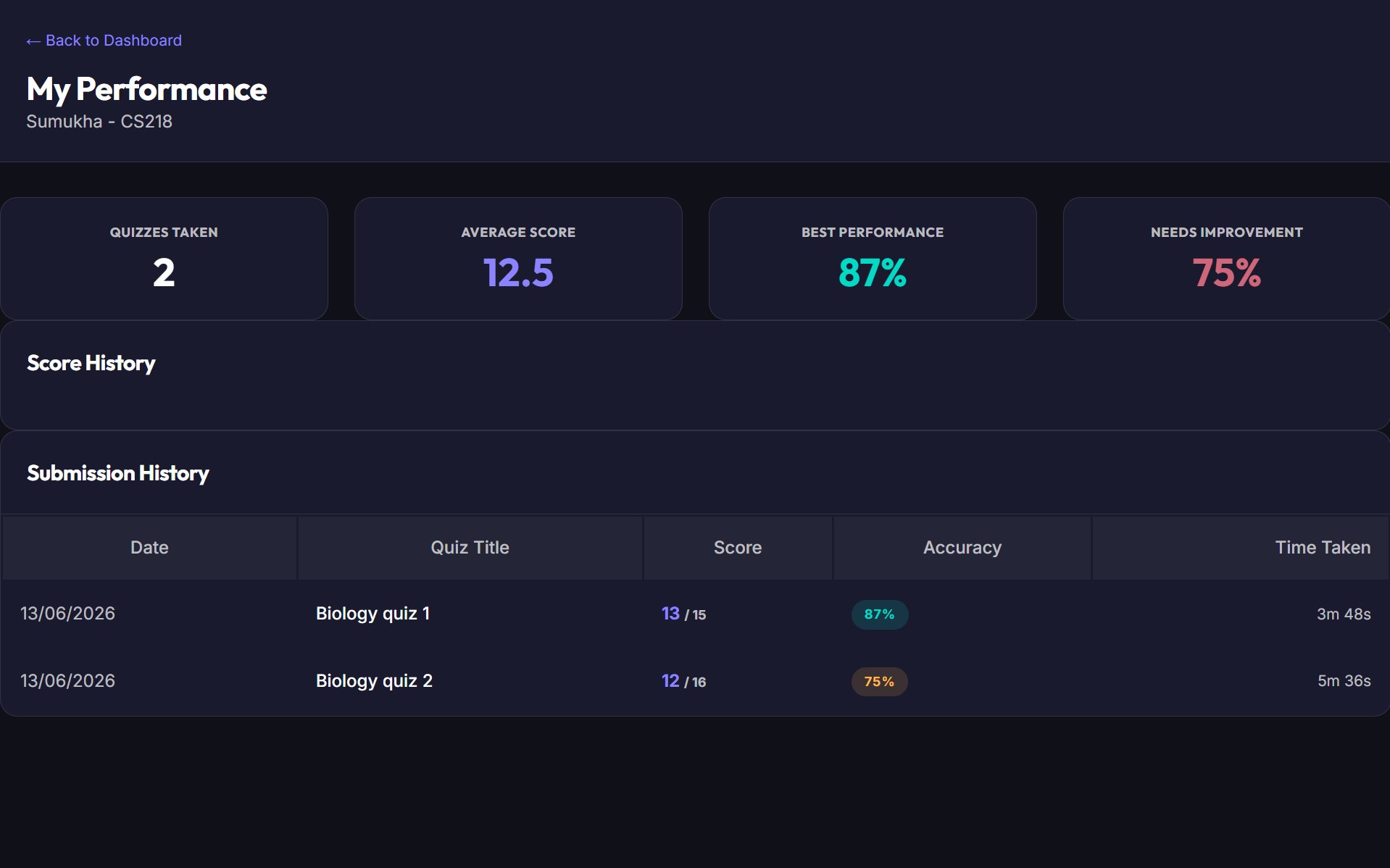
Student performance dashboard with score history and submission history table
07

Student Performance Tracking

Students see their complete performance dashboard — quizzes taken, average score, best performance, and areas that need improvement. Every quiz builds the dataset.

  • Quizzes taken & average score
  • Best vs weakest performance
  • Per-quiz accuracy tracking
  • Full submission history with timestamps

Interested in ScoreMCQ for your Institute?

Want to bring ScoreMCQ's CBT-style exam platform to your classroom? Get in touch with us to learn more about access and onboarding.

Contact Us

Features That Matter

Everything you need for modern education — whether you're a student studying independently or a teacher running an institute.

AI-Powered

Generate MCQ quizzes from any study material using advanced AI. Works with printed and handwritten notes.

Real-Time Analytics

Instant score breakdown, performance trends, and class-wide insights. Know exactly where you stand.

CBT-Style Exams

Professional Computer-Based Testing interface with timer, question palette, and mark-for-review.

Classroom Management

Create classrooms, share join codes, and manage students. Zero admin overhead.

LBA-Compatible

Negative marking, shuffle options, and deadline-locked results make ScoreMCQ ideal for Learning-Based Assessments.

Dark & Light Mode

Comfortable studying and teaching any time. Switch themes based on your environment.

How It All Works Together

A connected loop between teacher and student — every action feeds the next.

Teacher (Web App)

1

Create Classroom

Set up classrooms with subject tags and get a unique join code.

2

Build Quiz

Create MCQ quizzes with custom settings — timer, marking, shuffle.

3

Configure & Publish

Set grading rules, result visibility, and publish to students.

4

Analyse Results

Get real-time analytics, score distributions, and hardest questions.

Student (Web + Mobile)

1

Join with Code

Enter the classroom code shared by the teacher to join instantly.

2

Take Quiz

Attempt the CBT-style quiz with timer, palette, and review tools.

3

Get Score

Instant score card with correct, incorrect, and skipped breakdown.

4

Track Growth

Performance page shows history, trends, and areas to improve.